
If you sell digital products with WooCommerce, you probably update your files regularly. You may fix bugs, add new content, improve templates, or release a new version of your product.
But there is one major problem.
By default, WooCommerce does not notify past customers when you update a downloadable product.
This means your customers may continue using outdated files without knowing that a newer version exists. It can also lead to unnecessary support requests from customers who are missing fixes or improvements.
Shogun Product Update Notifier for WooCommerce
The Shogun Product Update Notifier for WooCommerce plugin solves this problem by allowing you to notify past buyers whenever you update a downloadable product.
Instead of manually emailing customers one by one, the plugin lets you queue and send update notifications automatically with a single click.
The plugin is designed to work safely even on large WooCommerce stores. Rather than sending all emails instantly and overloading your server, it uses WooCommerce’s built-in Action Scheduler to process emails in the background.
Whether you have a few customers or thousands of past buyers, the process remains stable and efficient.
Why this Plugin is Useful
If you sell digital products, keeping customers informed is important. Customers expect updates, especially when products are actively maintained.
Sending update notifications helps customers:
- access the latest version of your product
- receive bug fixes and improvements
- stay informed about new features or added content
It also improves the overall customer experience and reduces confusion.
The plugin works well for stores selling:
- WordPress plugins
- themes
- ebooks
- templates
- software
- downloadable resources
Main Features
One of the biggest advantages of the plugin is its background email processing system. Many bulk email systems try to send every email immediately when a product is updated. On larger stores, this can slow down the website or even crash the server.
Shogun Product Update Notifier avoids this issue by using WooCommerce Action Scheduler to queue emails safely in the background.
Another useful feature is that the plugin uses native WooCommerce email templates. Your update emails automatically inherit your existing WooCommerce branding, including your store logo, email header, footer, and sender details.
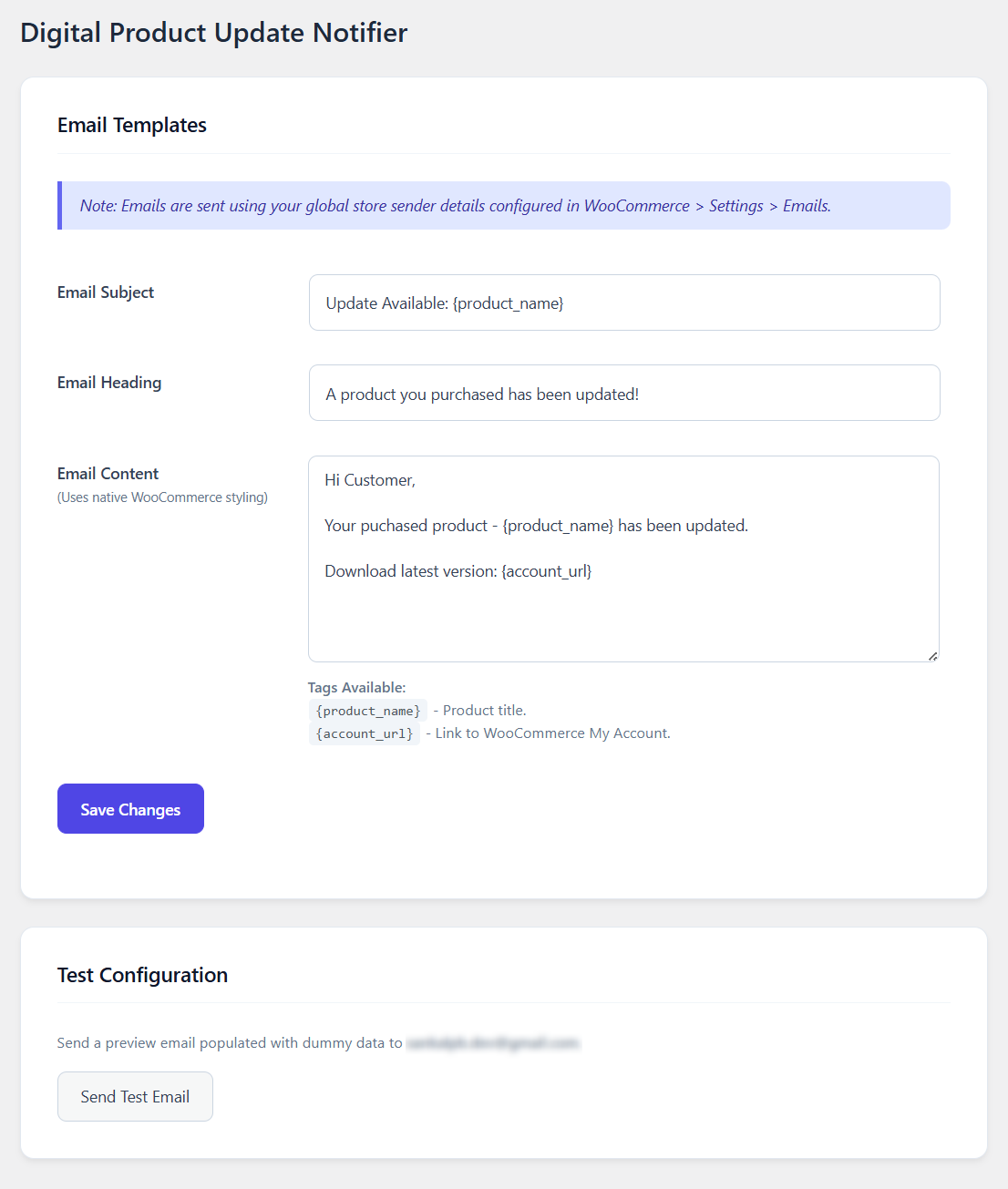
The plugin also allows you to customize the email subject line, heading, and message content directly from the WordPress dashboard.
You can personalize emails further using dynamic tags such as:
{product_name}{account_url}
A built-in test email tool lets you preview the email before sending it to customers. The plugin also keeps secure broadcast logs so you can track email queue activity from your dashboard.
How to Set Up the Plugin
Follow these steps:
Step 1: Install and Activate the Plugin
Search for “Shogun Product Update Notifier for WooCommerce” and install the plugin. Activate it.
Step 2: Configure the Email Template
Go to: WooCommerce → Update Notifier
From there, you can edit the email subject, heading, and message content. You can also use dynamic tags like {product_name} and {account_url} inside the email template.
Step 3: Send a Test Email
Before notifying customers, use the test email feature to send a preview email to yourself. This helps you verify formatting, links, and message content.
Step 4: Notify Past Buyers
Edit any downloadable WooCommerce product.
Before clicking the Update button, enable the “Notify Past Buyers” checkbox. Then click Update.
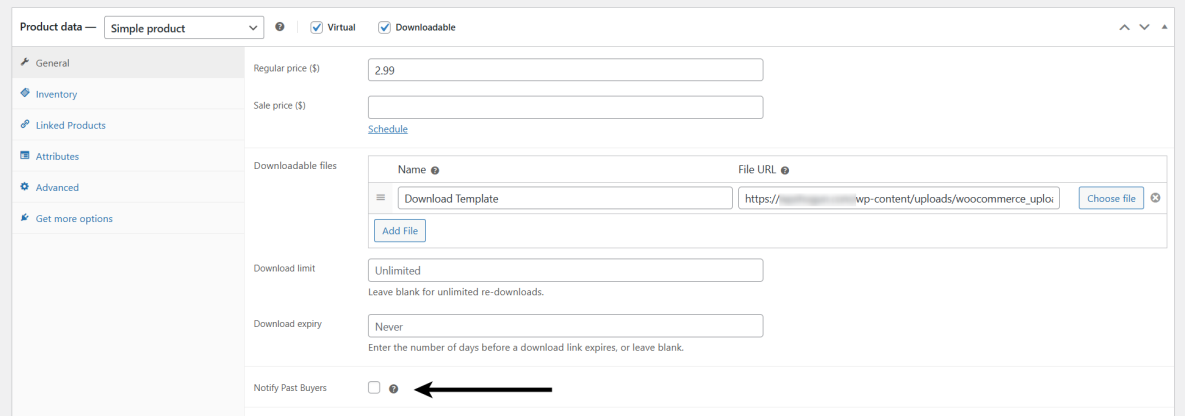
The plugin will automatically queue emails to customers who previously purchased the product.
How the Email Process Works
Once the update is triggered, the plugin creates a background email queue. WooCommerce Action Scheduler then processes the emails gradually in the background.
This approach prevents server overload and makes the plugin suitable for stores with large customer lists.
Final Thoughts
WooCommerce does not include a built-in feature for notifying customers when downloadable products are updated.
The Shogun Product Update Notifier for WooCommerce plugin fills this gap with a simple and reliable solution.
It allows you to notify past buyers with one click, send branded WooCommerce emails, customize templates, and safely process large batches of emails in the background.
If you regularly update digital products, this plugin can help you keep customers informed without adding extra manual work.